If you're a commercial real estate broker, a manual retail-map workflow may involve screenshotting a base map, sourcing artwork, pasting it into PowerPoint, and drawing connectors between tenants and locations. That approach can work, but it leaves the team responsible for consistency, matching, layout, and export quality.
The Free tier of CRE Retail Maps lets you build and preview up to three maps in a purpose-built editor. It does not include downloads. This guide compares that evaluation workflow with a traditional DIY approach and explains what Pro unlocks if you decide to export.
Compare the DIY Approach
One common process is to take a map image, place it in PowerPoint or Canva, layer on retailer artwork, draw lines, add text boxes, and align each object manually.
Review these workflow considerations:
- Workflow steps: Research, artwork sourcing, alignment, and revision live in separate tools or files.
- Consistency: Every map looks different because you're starting from scratch each time. Fonts, colors, and logo sizes vary from one map to the next.
- Logo quality: Finding high-resolution retailer logos means hunting through Google Images, often landing on pixelated or outdated versions.
- Export settings: Image quality depends on the source map, slide dimensions, export settings, and final placement. Test the actual file at print size.
- Updates: A tenant change may require editing the source map, artwork, connectors, and slide layout in separate places.
For recurring listings, those decisions are easier to manage when the team documents a repeatable process.
What a Purpose-Built Retail Map Maker Does Differently
A dedicated retail map tool like CRE Retail Maps is designed specifically for commercial real estate professionals. Instead of stitching together screenshots and clip art, you work directly on an interactive map with tools built for the job.
Here's what changes when you switch from DIY to a purpose-built platform:
Artwork search instead of open-ended file hunting. CRE Retail Maps includes searchable brand-artwork candidates. Search by name, inspect the returned mark, verify that it matches the intended business, and place it on the map.
Nearby-business search with curation. Search the visible map area by category - restaurants, pharmacies, fitness centers, and others - then review the returned businesses and select what to add. Verify locations and any suggested artwork before placement.
Leader lines that stay connected. Drawing arrows in PowerPoint requires separate positioning. In a dedicated map tool, leader lines connect artwork to user-reviewed map anchors and remain attached when you reposition the artwork.
Drag-to-group containers. When you need to show a cluster of tenants in a shopping center, you can group artwork into labeled containers inside the map editor rather than constructing that layout separately.
Professional export options on Pro. Download 2D PNG or JPG files up to 8000 pixels, 3D images up to 4096 pixels, or use one of five PDF layouts. Choose dimensions and layout based on the final OM, flyer, presentation, or email placement.
Compare the Workflows on Your Own Map
Universal time-savings numbers are misleading because tenant density, number of categories, artwork availability, and internal review standards vary. Test both approaches with the same property:
| Task | DIY workflow | CRE Retail Maps workflow |
|---|---|---|
| Base map | Capture and manage a source image | Work in the map editor |
| Nearby businesses | Research and record separately | Search, review, and select results |
| Brand artwork | Source, inspect, and resize files | Search candidates and verify matches |
| Connectors and groups | Draw and align slide objects | Use leader-line and grouping controls |
| Output | Configure the design tool's export | Preview free; download on Pro |
No Design Skills Required
A free retail map maker can provide preset layout controls without requiring separate design software. You remain responsible for the selected data, artwork, placement, and final review.
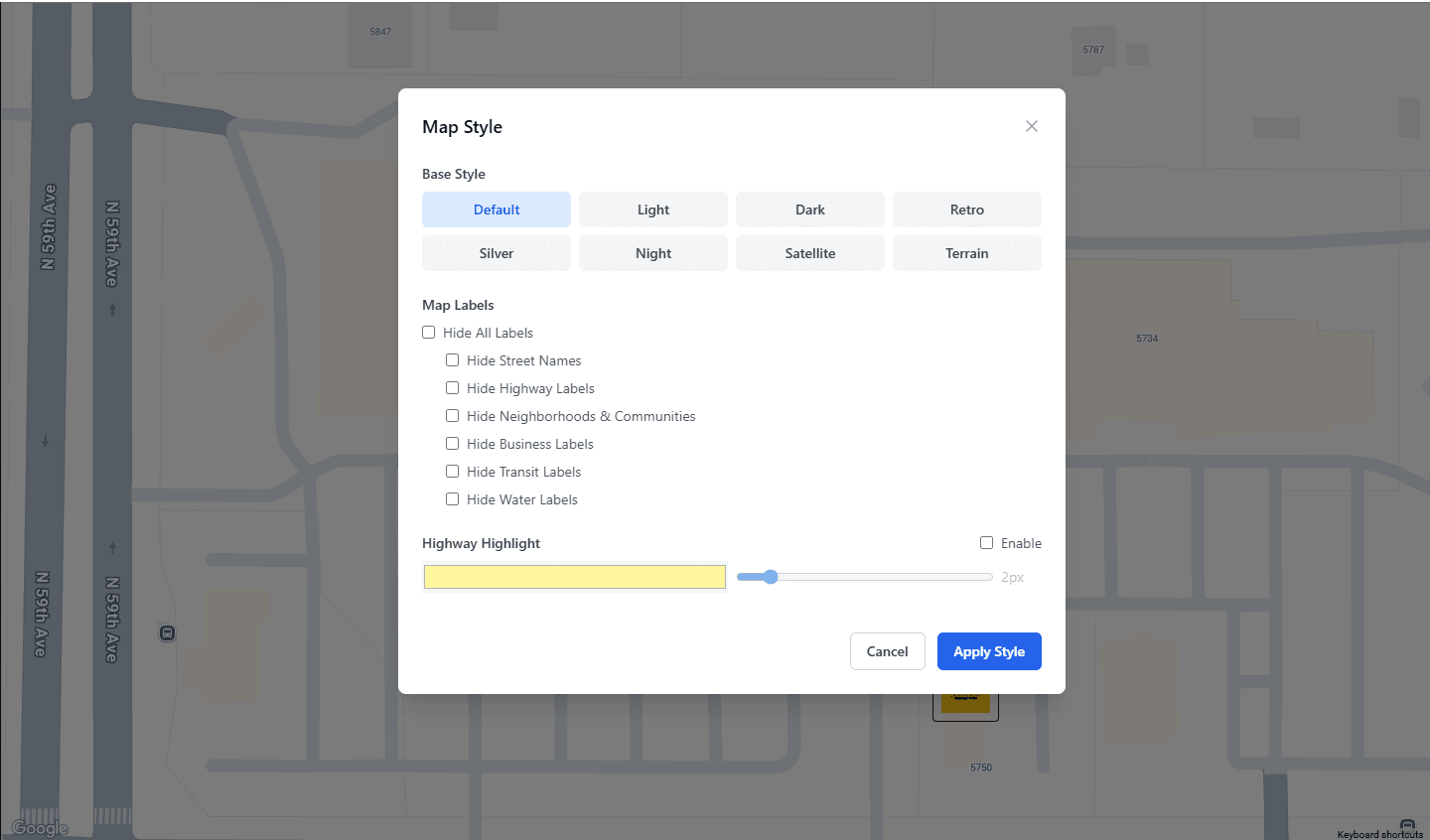
Choose from nine map styles - Default, Subtle, Light, Dark, Retro, Silver, Night, Satellite, and Terrain. Use preset or custom colors, adjust highway highlighting, and toggle label visibility for streets, businesses, transit, and other map features.
During the current editor session, undo/redo can step back through recent supported edits such as moving artwork, changing a color scheme, or repositioning a container.
Getting Started for Free
The Free tier includes up to three maps for building and previewing the editor, artwork search, nearby-business workflow, map styles, and layout tools. It does not include downloads. Pro is $39/month or $379/year and unlocks unlimited maps, image downloads, five PDF layouts, and other Pro features.
Head to CRE Retail Maps to build and preview a representative map. Upgrade only if the workflow fits and you need to download the result.
Related guides
- Retail map maker - The free tier + paid upgrades
- Pricing - What free vs paid unlocks
- Start for free - Jump in
CRE Retail Maps Editorial Team
VerifiedCRE Software & Industry Analysis
The CRE Retail Maps editorial team produces in-depth analysis of commercial real estate technology, retail market trends, and broker workflows. Our content is reviewed by retail brokers and industry practitioners with decades of combined experience covering grocery-anchored, power center, and lifestyle retail across major US markets.