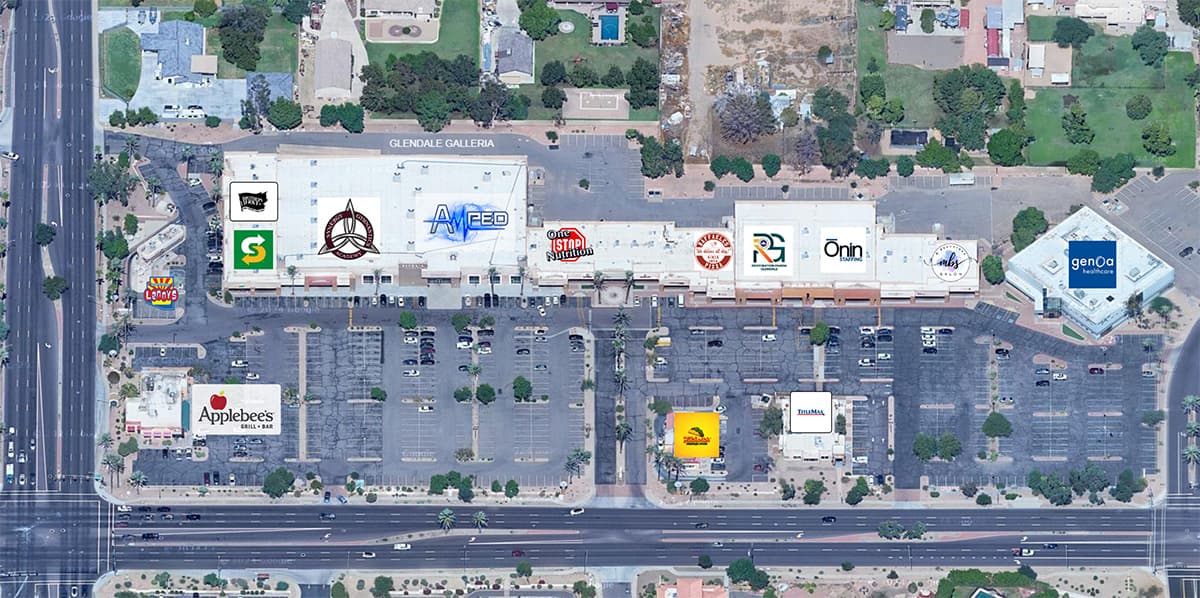
The retail-map page can give offering-memorandum readers quick spatial context about the subject property and selected neighboring tenants. It does not establish traffic patterns, foot traffic, or value without separately sourced evidence.
A poorly designed map (a blurry Google Maps screenshot with logos crudely pasted in PowerPoint) undermines the credibility of the entire document. A professional map, on the other hand, signals that you've done your homework and that the property deserves serious consideration.
This tutorial walks through the complete process of building a retail map for an OM using CRE Retail Maps, from property search to final export.
Step 1: Set Your Property Location
Open CRE Retail Maps and enter the subject property's address. The map automatically centers on the location and adjusts the zoom level to show the surrounding retail environment. You can fine-tune the zoom and pan to frame the exact area you want - typically a quarter-mile to half-mile radius around the subject property, depending on the density of the trade area.
For suburban properties with spread-out retail, zoom out to capture highway intersections and major shopping centers. For urban properties, zoom in tighter to show the immediate streetscape.
Step 2: Mark the Subject Property
Every OM map needs a clear "you are here" indicator. Place a subject property marker on your parcel - this creates a highlighted box with a "SUBJECT PROPERTY" label that immediately draws the viewer's eye. Position it precisely over the building footprint or parcel boundary.
Step 3: Add Anchor Tenants and National Brands
This is where the map starts telling a story. Use brand search to find artwork candidates for significant tenants near your property, review each match, and place the appropriate marks. Start with anchors and other recognizable traffic generators, then work outward to smaller national and regional tenants.
Artwork placed from Brand Logo starts as an image overlay at a safe map position; it does not know the tenant's storefront. Verify the location, move the image where it reads clearly, then toggle a leader line and set its anchor manually. A business added through Nearby Places carries the returned coordinates and a location-aware line, but those coordinates still need review.
Step 4: Search Nearby Businesses
Don't stop at the tenants you already know about. Search the visible map area by category:
- Restaurants - Reviewed dining results returned for the current map area
- Banks - Chase, Wells Fargo, Bank of America locations
- Grocery - Supermarkets and specialty food stores
- Fitness - Gyms, yoga studios, fitness centers
- Coffee - Starbucks, Dunkin', local coffee shops
- Pharmacy - CVS, Walgreens, Rite Aid locations
The tool searches the visible map area and returns businesses for review. Select the results that support the OM narrative, verify their locations, and confirm any suggested brand artwork before placing it.
Step 5: Group Related Tenants
For denser areas with many nearby businesses, use drag-to-group containers to organize logos into labeled clusters. For example, create a container titled "Dining & Shops" and drag four or five restaurant logos into it. The container displays them in a clean grid layout with a header label.
Grouping keeps the map organized and prevents logo overlap in tight areas. It also creates a visual hierarchy - the viewer sees grouped categories rather than a scattered collection of individual logos.
Step 6: Style the Map
Now style the map to match your brokerage's brand identity:
- Map style: For some OMs, Light or Silver may provide geographic context without competing with the artwork and leader lines.
- Brand colors: Set your brokerage's hex color using the custom color picker. This applies to containers, leader lines, and highlights.
- Highway highlighting: If road orientation is relevant, highlight reviewed roads with a colored overlay. Adjust weight and opacity for readability.
- Label controls: Turn off business labels (your placed logos replace this function). Keep street and highway labels on. Toggle area labels based on whether neighborhood names add value.
Step 7: Save POIs for Future Maps
Pro users who frequently work in the same market can save placed tenants to the POI Database for reuse across their own maps. Treat saved POIs as a starting point and recheck tenant status, location, and artwork before each new OM.
Step 8: Export for the OM
CRE Retail Maps Pro offers image and PDF export paths, and for an OM you may want both:
- 2D PNG or JPG (up to 8000 pixels) - Use an image export if you're assembling the OM in InDesign, Canva, or another layout tool. Choose dimensions for the final placement rather than assuming one resolution fits every document.
- One of five PDF layouts - Use a PDF layout if the map will be a standalone page in the OM. Profile and property fields can be included in a page that is ready to insert into the package.
Photorealistic 3D maps can be downloaded as images up to 4096 pixels. Building and previewing are available on the Free tier; downloads require Pro.
Image exports and PDF layouts use the saved map content and styling, but each export path has its own framing or page composition. Review the generated image or PDF before publishing it.
Common Mistakes to Avoid
- Too many items - Include only the reviewed businesses relevant to the assignment and leave enough space for labels to remain readable.
- Wrong zoom level - Too far out and the artwork is difficult to read. Too close and relevant context may fall outside the frame. Document and review the chosen visible area.
- Inconsistent styling - Set the intended colors and styles, then apply the same convention when consistency is required.
- Unsuitable export dimensions - Choose dimensions for the final print or digital placement and review the result at its intended size.
What the Visual Workflow Provides
A reviewed retail map gives readers a consistent way to see the selected co-tenancy and location context. The browser workflow brings address search, artwork-candidate review, nearby-business selection, styling, and Pro export into one editor without promising a deal outcome or fixed production-time improvement.
Related guides
- Retail maps for offering memorandums - The OM workflow explained
- Branded PDF templates - Ready-to-use template gallery
- Make a retail map - The complete browser workflow
CRE Retail Maps Editorial Team
VerifiedCRE Software & Industry Analysis
The CRE Retail Maps editorial team produces in-depth analysis of commercial real estate technology, retail market trends, and broker workflows. Our content is reviewed by retail brokers and industry practitioners with decades of combined experience covering grocery-anchored, power center, and lifestyle retail across major US markets.